My Development Machine Lives in a Data Centre
TL;DR
Almost all my development is agentic now. I work from thin clients connected to one rented OVH bare-metal server, so my agents keep working while I move between home, cafés and campus. Separate VMs handle primary Linux development, work, Windows, macOS, an always-on agent, and personal apps. Xcode, iOS simulators and Android emulators run remotely. T3 Code connects the agent workflow: Codex is my coding workhorse, Claude is especially good at animation, and Argon handles writing and spotting AI tics. I use Theo's council skill for independent model reviews. Personal apps sit behind Cloudflare Access; most projects deploy to Cloudflare Workers.
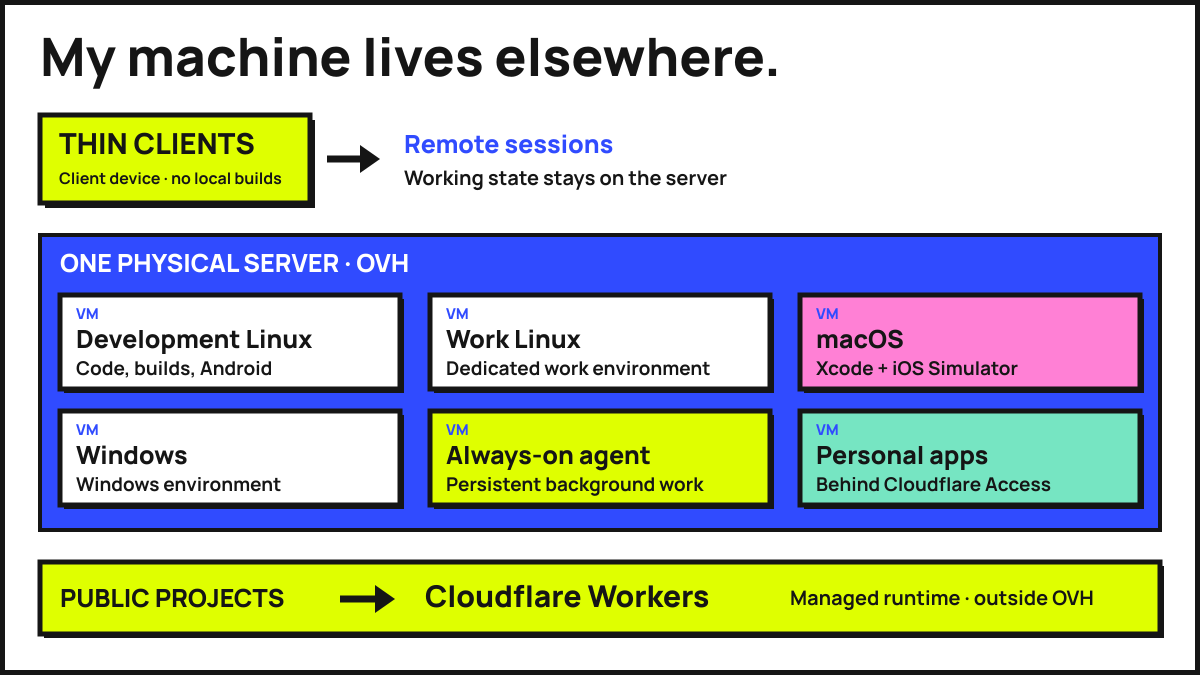
My schedule can be a bit chaotic. I might start the day working from home, move to a café, then drive my partner to campus and work from there. I want the agents I left running at home to keep working while I'm on the go, without needing to keep a laptop awake in my bag.
Almost all the development I do is agentic these days. I already need an internet connection to use the agents, and to push or pull from GitHub. Requiring a connection to reach my development server fits the way I'm working anyway. A fully local environment would let me do some things offline, but it would not make my usual workflow available offline.
So my development machine lives in a data centre. I rent an OVH bare-metal server and run separate VMs for the different environments I need. The client in front of me supplies a screen and keyboard; the server holds the checkouts, build tools, emulators and running agents.
Close the laptop, leave the work running
The useful part is what happens between sessions. I can leave an agent working through a change, close the laptop, travel somewhere else, and reconnect to the same environment. The checkout and running processes stay on the server while I'm away.
That also means changing devices does not require moving my development state. There is still coordination between VMs when a project needs more than one operating system, but switching screens is separate from that.
I should admit that I still own three Macs, and I tend to bring two with me when I'm out. This has not cured me of carrying computers around. I just no longer need both of them to get ordinary development work done. They still have their uses for the few tasks where I want them, rather than each being an essential part of the setup.
Why rent it?
If I lived in one stable location, I would buy a server and leave it running at home. That would give me the same persistent environment to connect to from elsewhere.
That is not an option for me at the moment, so I rent the hardware from OVH. Renting is a practical answer to where I can keep a machine running, rather than a requirement of this architecture. The important part is that the work has somewhere to continue while I'm moving around.
Separate environments, one physical box
Rather than running everything inside one sprawling operating system, the OVH host is divided into separate virtual machines. Splitting them up keeps dependencies clean, isolates work from personal experiments, and gives each operating system the environment it expects.
- Primary development Linux VM: This is where most of my day-to-day software engineering happens. My personal repositories, TypeScript monorepos, web builds, and Linux toolchains live here.
- Work Linux VM: A dedicated Linux environment strictly for professional work. The separate environment gives professional work its own place, away from personal experiments and their dependencies.
- macOS VM: Dedicated to Apple platform requirements. It runs native Xcode builds and iOS simulators, so I can compile, inspect, and interact with iOS targets remotely.
- Windows VM: Kept on hand for Windows-specific testing, desktop tooling, and the occasional workflow that genuinely requires a native Windows environment.
- Always-on agent VM: A persistent environment where autonomous and long-running background agents can work continuously without tying up my interactive development shells or stopping when I disconnect.
- Personal apps VM: A separate virtual machine that hosts my self-contained personal utilities and internal tools, placed behind Cloudflare Access.
The macOS VM also means I am no longer leaning on GitHub Actions macOS runner minutes for this work. Nobody tell Apple about the Hackintosh VM.
Mobile development fits into this split without needing local cables or local hardware acceleration on the client device. Both iOS simulators and Android emulators run remotely on the host, while native Xcode builds execute on the macOS VM and standard backend and web builds stay on the primary Linux VM.
Where code actually ships
Having a capable bare-metal server makes it tempting to host every production project on the same box, right alongside the development VMs. I deliberately avoid doing that for public software.
Most of my projects deploy to Cloudflare Workers and the surrounding Cloudflare platform. Keeping public deployments on managed edge infrastructure means a heavy compile or a virtualization experiment on my development host never touches live user traffic.
The exception is my suite of personal tools and internal apps. Those live on the dedicated personal apps VM, separate from the active development environments, gated behind Cloudflare Access with an access check in front of them.
Multi-model workflows in T3 Code
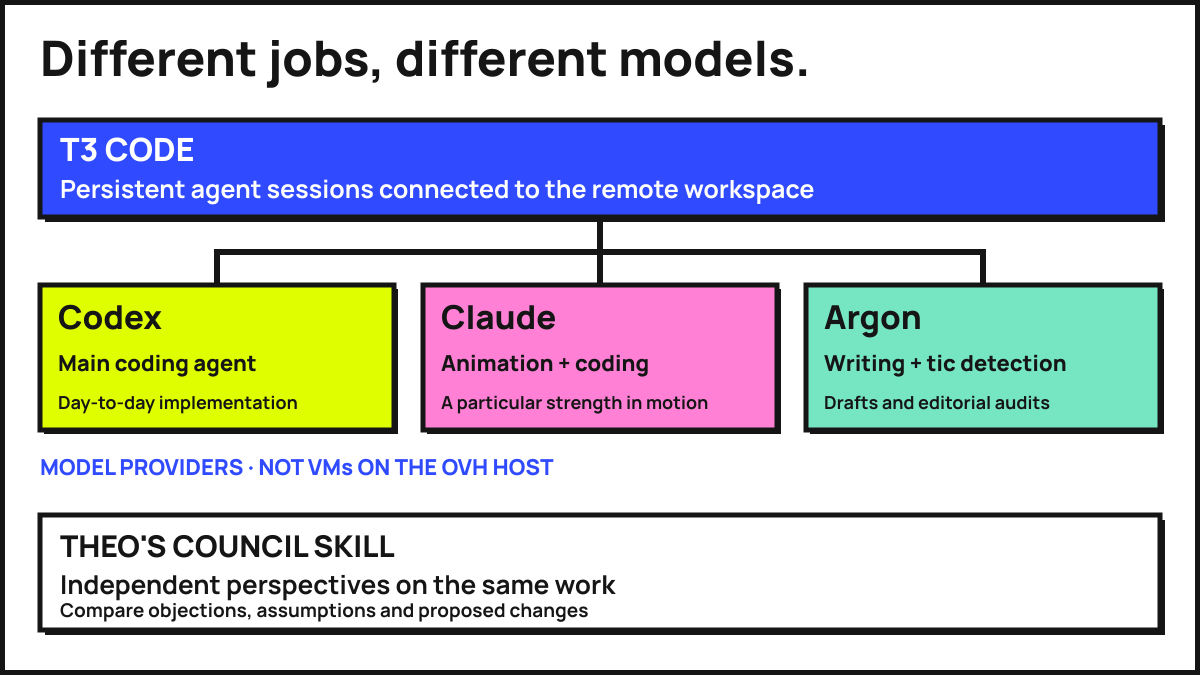
Centralising the development environments on always-on remote VMs also makes multi-agent workflows much more natural to run. I use T3 Code as the control surface for agent work, alongside Theo's council approach to bringing several models into the same problem. The remote environment holds the checkout and running tools; T3 Code gives me a way to direct the work from the client in front of me. The models themselves are accessed through their providers, rather than running inference on my OVH server.
Codex is my main working agent. It is the default for day-to-day coding: following an existing codebase, making changes, fixing problems and working through verification. Most tasks start there rather than with a debate about which model to use.
Claude is particularly good at animation work. It also writes code, but motion is a reason for me to choose it deliberately over the default. Timing and movement call for a different eye from the one I need for a routine implementation.
Argon is my choice for writing and tic detection. I use it to draft text and to find the habits that make generated prose feel generated: repeated openings, stock transitions, unnecessary rhetorical questions and the same sentence rhythm appearing everywhere. A useful audit looks across a body of writing, because a phrase that seems fine once can become very conspicuous on its tenth appearance. Argon drafted this post too.
I also use the council skill Theo posted to get independent perspectives on the same work. That is a different use of multiple models from dividing up implementation. For a council review, I want the disagreements: what another model thinks is weak, what it would change, and which assumptions it challenges. Giving a reviewer a fresh context is useful precisely because it has not spent the last hour defending the implementation.
That fits the remote setup well. The checkout, build tools and long-running sessions live in persistent environments, so switching models or checking in from another client does not mean rebuilding the workspace around them.
Trade-offs and failure modes
A bad connection still makes remote interaction unpleasant, and no connection means I cannot reach the server. The difference from a laptop-centred setup is that losing my connection does not stop the agents or builds already running there. I lose my view into the work until I reconnect.
Several virtual machines on one physical server still share a single physical failure domain. Virtualization gives me clean software isolation between work, personal projects, macOS builds, agents, and personal apps, yet they all sit on the same underlying motherboard, power supply, and network link at OVH. If that physical host has a hardware fault, all these environments go down together. Deploying most public projects to Cloudflare Workers keeps their runtime separate from this machine. The VMs help contain ordinary software problems, but they do not provide high availability or replace a recovery plan.
Pick up where I left it
The setup suits a day that moves between places. My working environment stays put, and my agents can keep going while I'm driving to the next place I can sit down. When I reconnect, I want to see what they got done, rather than spend the next session getting a different laptop ready.